Sodyby Humelo

Rebook? Checkup prep?
Done in one call.

Identity checks, moving bookings to open slots, and prep instructions, all handled by your AI agent, Sody.

Try a call with the AI agent

Call language

Other

Loading demo cards…

Korean mobile numbers (010) only

When the demo ends, we will send a demo summary and information on talking to sales to this number.

By signing up, you agree to the Terms of Service.

Answer, call, hand off,
record: watch your own
AI agent, Sody, at work

See what the AI agent does, from the moment it answers a customer’s call to the moment the conversation history is saved. Turn on the sound to hear Sody’s AI agent voice, too.

Humelo Sody AI callbot intro video
  • Choose from 195+ voices beyond the ones in the video

    Nana (a bright, clear guiding tone) and Yungi (a gentle male guiding tone), heard in the video, are agent voices you can actually choose in Sody.

  • Clone your company’s signature voice, too

    Create your own AI agent from a single voice sample under 20 seconds.

It doesn’t stop at answers.
It gets work done in the tools you use

Sody connects to your online store’s order management, Google Sheets, Slack, text messaging, and KakaoTalk Channel. During a conversation, it looks up orders and logs returns, then saves requests and summaries straight to your sheet and messenger. Just enter your credentials in the Console and turn on the features you need.

Where customers come in

  • Phone
  • Web chat
  • KakaoTalk Channel
SodyAI agent

Where the work gets done

  • Cafe24Order lookups, cancellations, returns
  • Google SheetsLogs requests, summaries, and refund requests
  • SlackAlerts for requests, new chats, and summaries
  • Text messagesConfirmations and notices
  • Cafe24Online store

    Handle store orders during the conversation

    • Order, shipping, and recent order lookups after mobile number verification
    • Cancels orders with the customer’s consent, and logs returns for orders in transit or delivered
    • Changes the shipping address before shipment (recipient and address, in chat)
    • Sends request confirmations and notices through the store’s Cafe24 SMS
  • Google SheetsSupport management

    Requests and summaries stack up in your sheet, one row each

    • Customer requests: time, inquiry, summary, and phone number
    • Summaries: saved right after a call, or 5 minutes after the last chat message
    • Logs returns, exchanges, and bank refund requests, and looks up sheet data
  • SlackSupport management

    Get Slack alerts for the moments that matter

    • Request details when a customer request is logged
    • The first message when a new chat starts in the web widget
    • A summary with the customer’s intent and resolution status when a conversation ends
  • Text messagesSupport management

    Text request confirmations and notices

    • Sends a confirmation to the customer’s phone once a request is logged
    • Resends what was explained on the call by text, if the customer wants
    • Sends through either SolAPI SMS or the store’s Cafe24 SMS
  • KakaoTalk ChannelMessenger channel

    The same AI agent handles KakaoTalk Channel chats

    • The agent replies to customer messages received by the channel chatbot
    • Picks up ongoing conversations with the same Kakao user
    • If a reply takes over 5 seconds, it sends a please-wait message, then the final answer
  • Enterprise integrationsTalk to sales

    Internal systems are connected within an agreed scope

    • Create Zendesk tickets and pass on customer info
    • Other messenger channels like Discord
    • Call internal tools through MCP or webhooks

How real customers
connect their tools

Cosmetics online store

From order lookups to return and refund requests, in one conversation

  • Cafe24
  • Google Sheets
  • Cafe24 SMS
  1. 1When a customer reaches out by phone or chat, it verifies their identity by mobile number.
  2. 2It looks up the order and shipping status in Cafe24 and answers right away.
  3. 3Returns are registered in Cafe24 as return requests, and refunds for bank transfer orders are taken as bank refund requests and logged in Google Sheets.
  4. 4Request confirmations can be sent through the store’s Cafe24 SMS.
  5. 5Summaries and requests stack up in Google Sheets, so staff can check everything in one place.

EV charging operator

AI summarizes and logs, staff reply by text

  • Google Sheets
  • Text replies
  1. 1The AI agent takes charging issues and feedback by phone.
  2. 2The AI automatically summarizes each call and saves it to Google Sheets, and staff review the sheet before following up.
  3. 3When staff write a reply in the Console’s conversation view, it’s automatically sent to the customer by text.
  4. 4Each text includes a short link to continue the conversation with the chatbot.

43 knowledge entries, running with a calm, trustworthy tone

It answers when customers call,
and calls first when needed

It handles order questions during the call and reaches out first with booking confirmations and results.

InboundIncoming calls

It answers for your team and finishes the job

From common questions to order lookups and refund requests, the AI agent wraps up calls within the rules you set.

Answers common questions from your docs
Upload materials like user guides, refund policies, and business hours, and it answers from them.
Goes beyond answers to log requests
It verifies identity, looks up the order, then logs refunds, exchanges, and address changes with a ticket number.
Leaves a record after every call
Highlights and requests are saved to the conversation history, so you can quickly see who asked for what.
Hands off when a person is needed
Questions it can’t handle itself are summarized and passed to the right staff member.
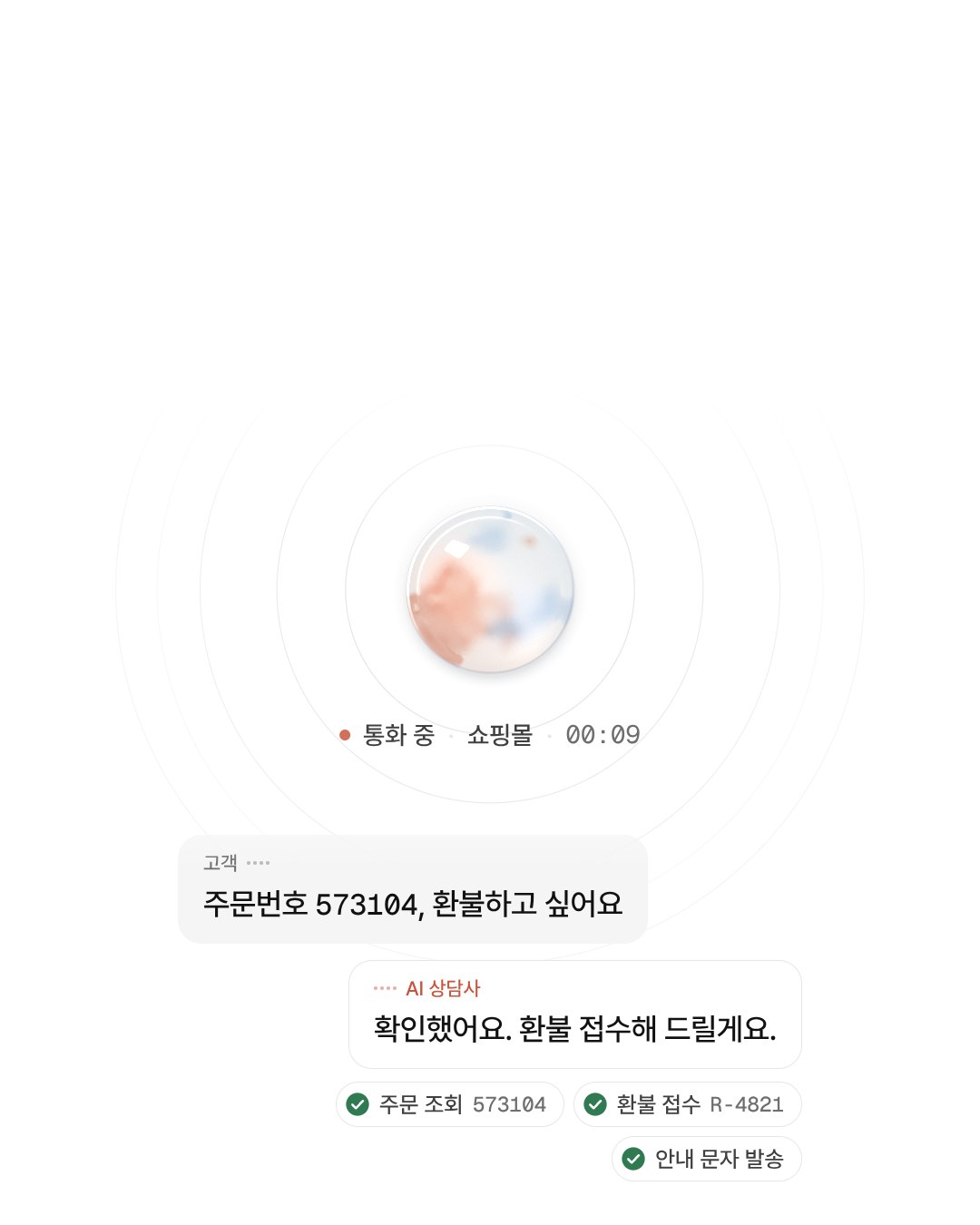
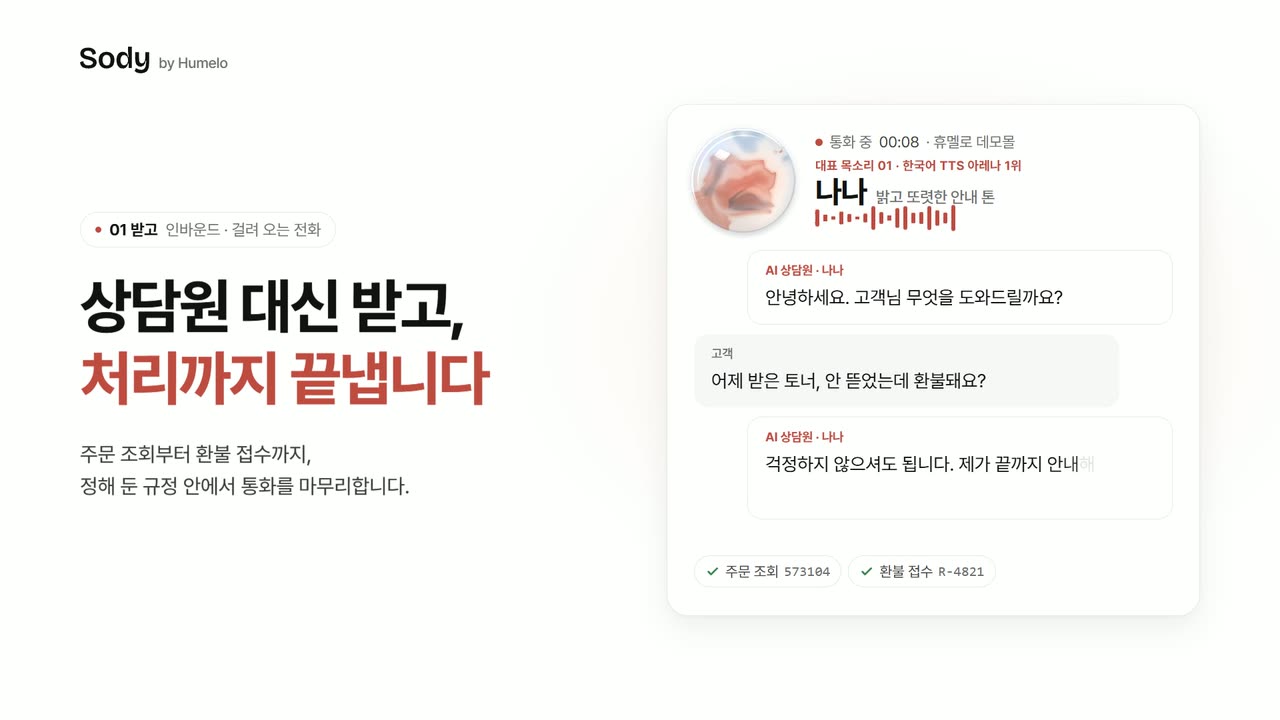
Humelo Demo MallIncoming call · Example

Customer

The toner I got yesterday is still sealed. Can I get a refund?

AI agent

I found order 573104. I’ve put in a refund minus the 3,000 won return shipping fee. I’ll text you the ticket number after the call.

  • Order lookup573104
  • Refund requestR-4821
  • Info text sent

OutboundCalls placed by AI

It makes the check-in calls you used to dial one by one

Booking confirmations, result updates, callbacks on consultation requests: the AI agent makes these daily calls in the same voice.

Confirm and change bookings in one call
It calls to confirm before the appointment, and if the customer wants a change, logs it right there.
Shares results directly
It calls with refund or exchange results or schedule changes, and answers follow-up questions.
Calls back on consultation requests
It calls customers who requested a consultation, asks what they need, and records it.
Follows up with texts and records
It texts the new schedule and next steps, and saves the call to the conversation history.
Humelo Demo ClinicCall placed by AI · Example

AI agent

Hello, this is the AI agent from Humelo Demo Clinic. I’m calling to confirm your internal medicine appointment on Thursday at 10:30 AM.

Customer

That day doesn’t work for me. Could I move it to Friday afternoon?

AI agent

I’ve moved it to Friday at 2:30 PM. I’ll text you the new time.

  • Booking lookupThu 10:30
  • Booking changeFri 14:30
  • Info text sent

One refund call:
what the agent did

This is what sets it apart from chatbots that only answer. Within the rules you set, Sody actually looks things up, logs requests, and records the results.

Sample screen.
  1. 00:00

    Picks up

    “Hello, this is the AI agent.” It says it’s an AI from the first line.

  2. 00:06

    Identity check

    It checks the name and the last digits of the mobile number to confirm the caller placed the order.

  3. 00:14

    Order lookup

    It finds order 573104 in the store’s order data and checks its status.

  4. 00:31

    Policy explained

    The item is unopened and the customer changed their mind, so it explains the refund minus a KRW 3,000 return shipping fee.

  5. 00:47

    Refund request

    If the customer agrees, it logs the request and reads out ticket number R-4821.

  6. After

    Record saved

    Highlights and requests are saved to the conversation history, and anything that needs a person goes to the right staff member.

  • Looks up

    Finds orders and bookings where you already keep them, like Cafe24 orders or Google Sheets.

  • Logs

    Records refunds, exchanges, and booking changes with a ticket number.

  • Notifies

    Texts tracking details and confirmations, and sends follow-ups to Slack.

  • Hands off

    Summarizes questions that need a person and passes them to the right staff member.

Beyond calls, a chatbot resolves with buttons and AI, and hands off to an agent if stuck

Common questions get instant answers from preset buttons, and anything the buttons don’t cover is answered by AI from your docs and website. If that doesn’t solve it, the customer continues with an agent in the same window.

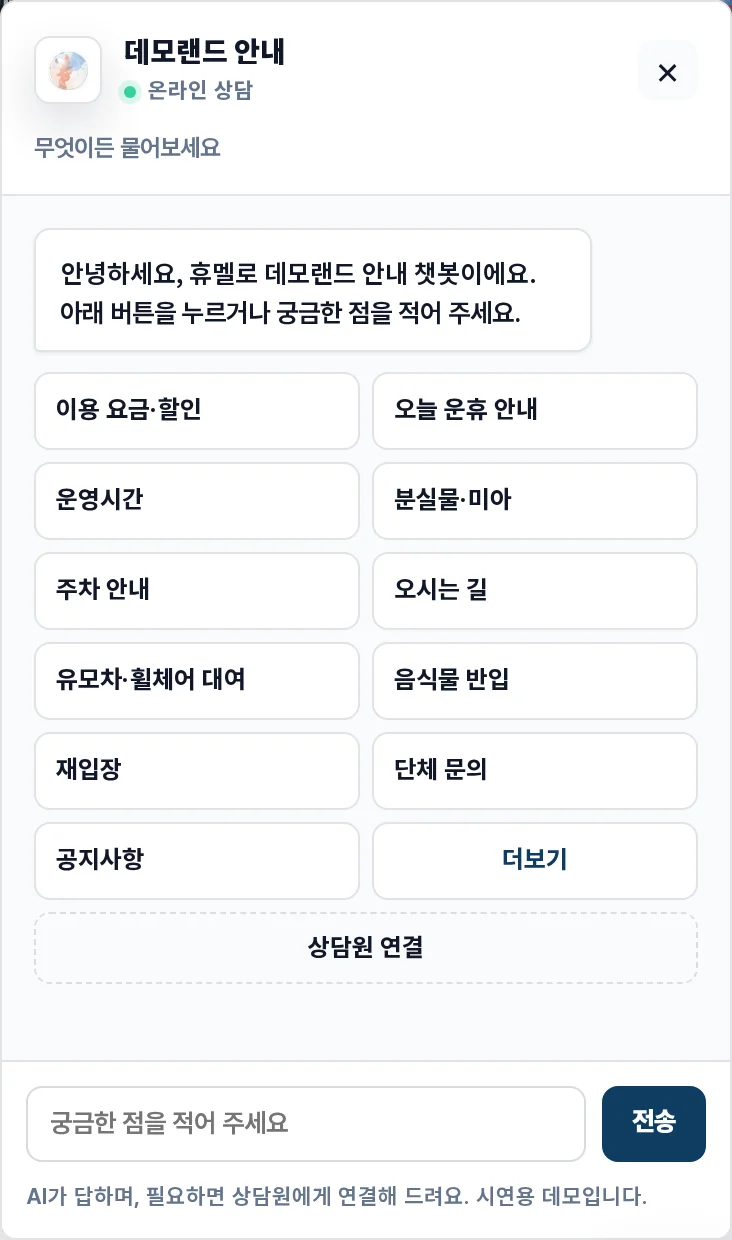
Common questions, right on the home screen buttons

A greeting appears with 11 buttons and a More option. Pages like a pricing page or a lost-and-found page can each have their own greeting and buttons.

Web chatbot home screen. Buttons like fees, hours, and parking info sit in two rows below the greeting

Demo screens. The company name and conversations are fictitious data.

Let AI handle it,
and step in only
when AI suggests it

AI reads risk signals in every customer message and sorts them into Caution, Intervention advised, and Urgent. Agents open only the suggested conversations, jump right in, and hand them back to AI when done.

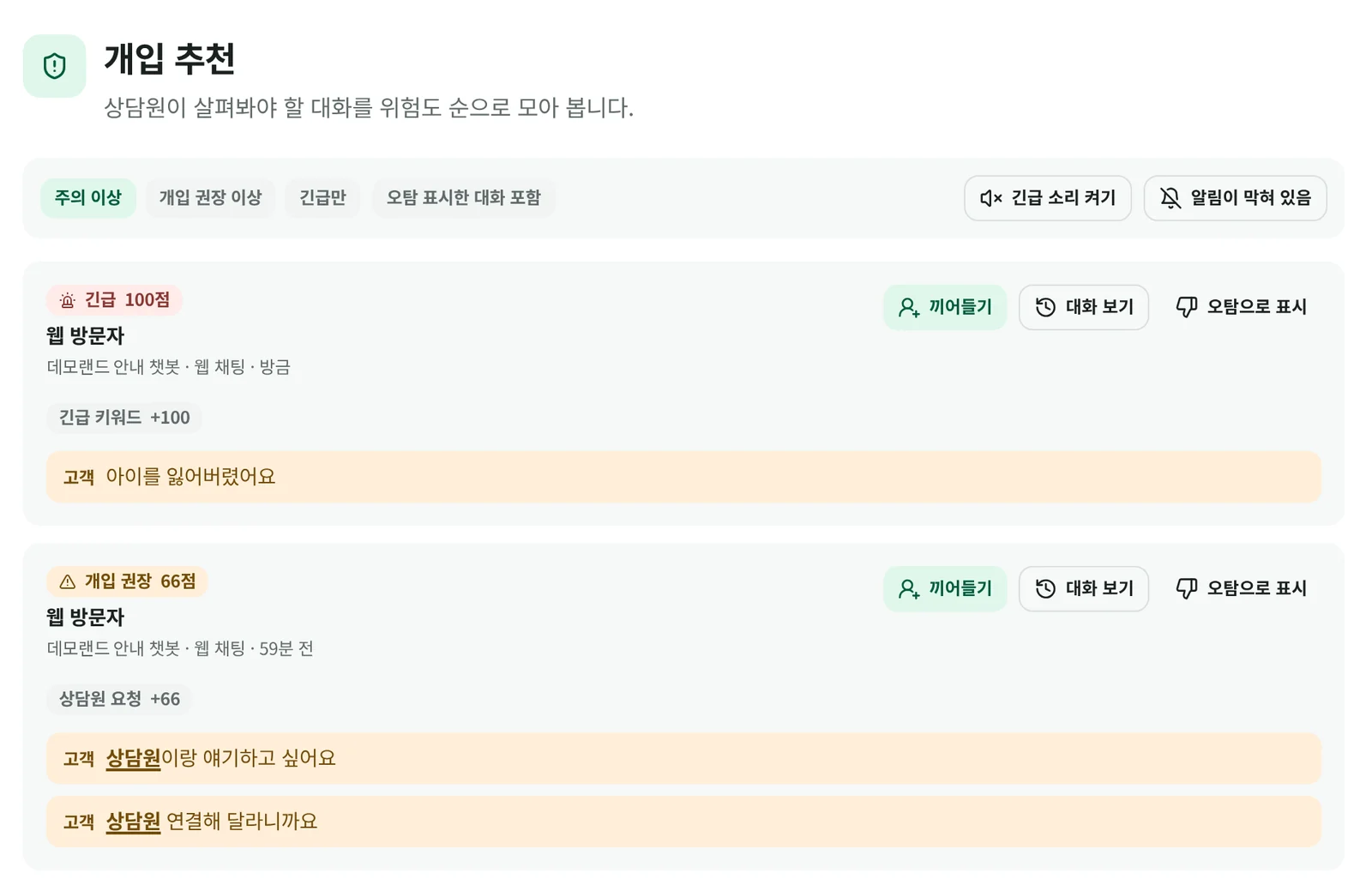
Conversations to review, sorted by risk

Each customer message gets a score from 0 to 100, sorted into Caution at 40+, Intervention advised at 60+, and Urgent at 80+, shown with the reason for the score and the messages behind it.

Suggested interventions screen. An Urgent 100-point and an Intervention advised 66-point conversation listed from the top with reasons and customer messages
  • Jump in, view the conversation, or mark a false positive right from the list
  • Urgent alerts appear as a desk banner and in Slack (Slack messages never include what the customer said or their contact details)
  • Urgent wording is matched by phrase, so ordinary questions like “Is it safe?” don’t set it off

Demo screens. The company name and conversations are fictitious data.

Your ops team changes
the buttons and answer rules

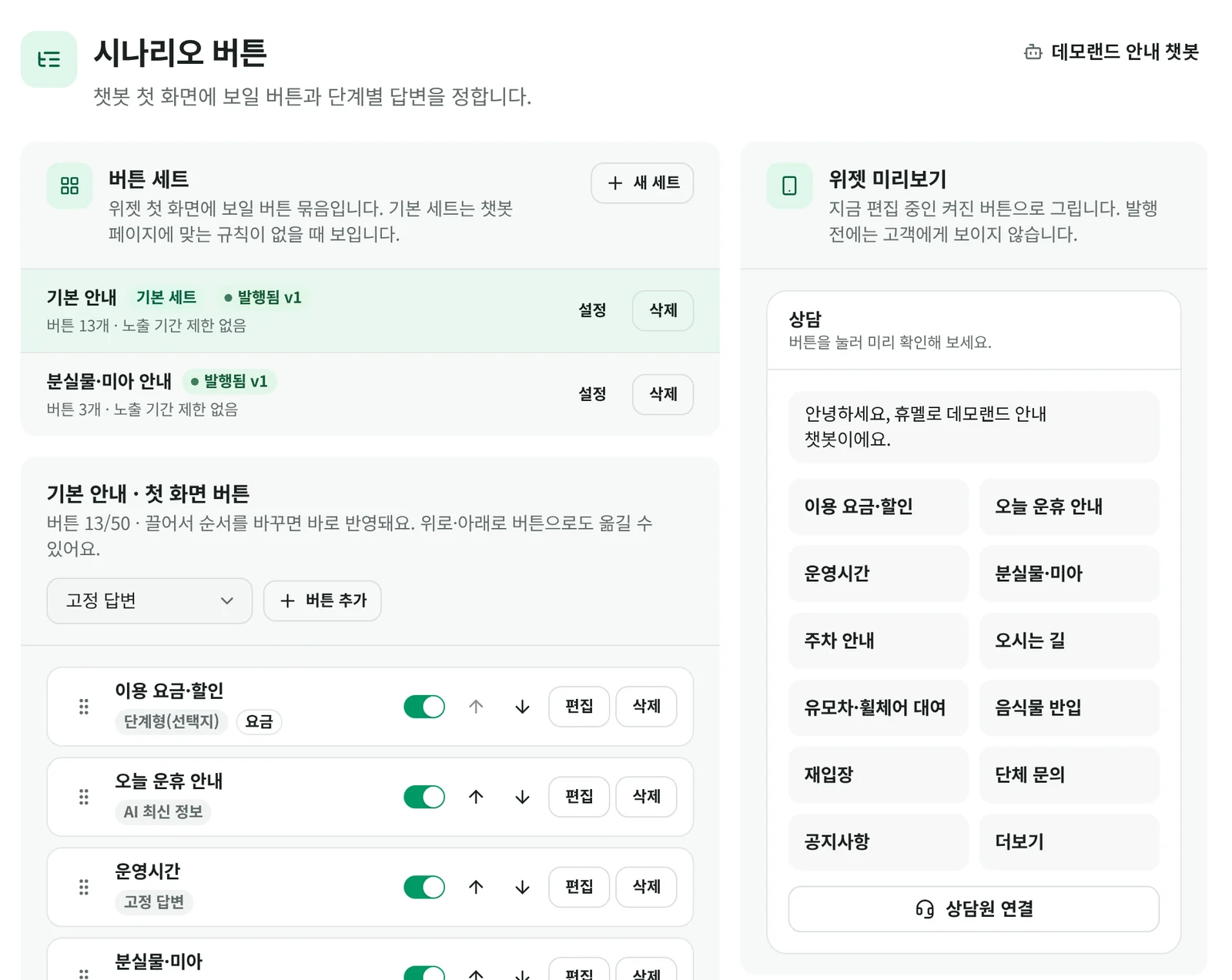
No developer requests needed: set buttons, answers, website crawling, business hours, and intervention criteria in the agent desk. Edited buttons appear in the chat window within 2 minutes of publishing.

Edit buttons and step-by-step answers yourself

Create button groups, then add, reorder, or toggle buttons. Pick a response type: fixed answer, step-by-step, AI with latest info, link, or transfer to a person.

Scenario button management. A widget preview next to the button list, response types, and on/off switches
  • Set a display period, and buttons turn on automatically only during it
  • Up to 5 steps, each with success and failure criteria and what to do on failure
  • Different buttons, greetings, and teams for each page, set by URL rules
  • Preview the home screen on the right before publishing

Demo screens. The company name and conversations are fictitious data.

Stats update in real time,
and AI answers your questions with its reasoning

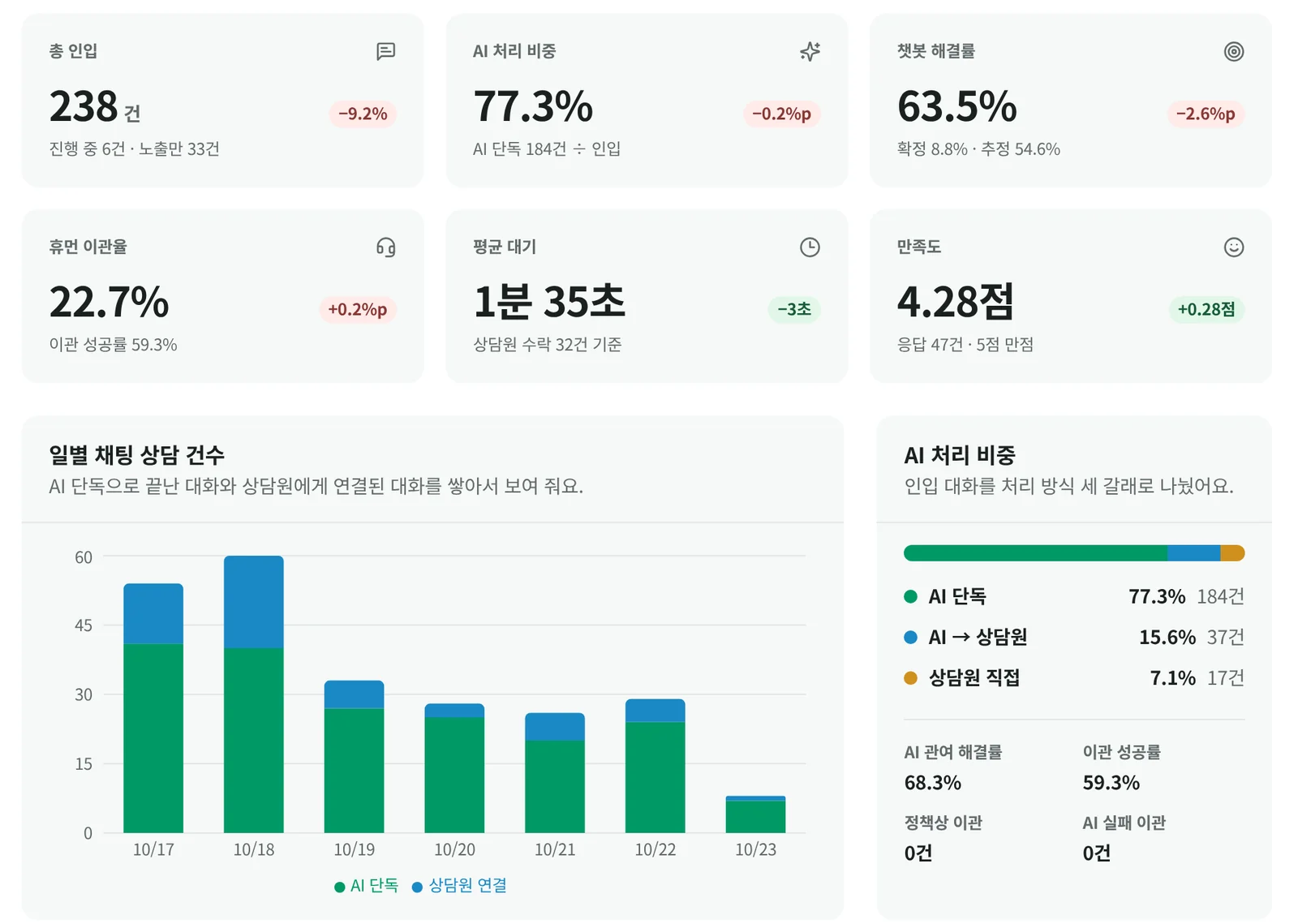
Stats dashboard. Cards like 238 total chats, 77.3% handled by AI, and 63.5% chatbot resolution rate, with a chart of daily chat volume

Stats

Compare total volume, AI handling share, chatbot resolution rate, transfer rate, average wait, and satisfaction against the previous period. See where customers get stuck by page, button, and step.

  • Daily, weekly, or monthly, in Korea time
  • Steps with under 60% completion are shown in red
  • Download as Excel
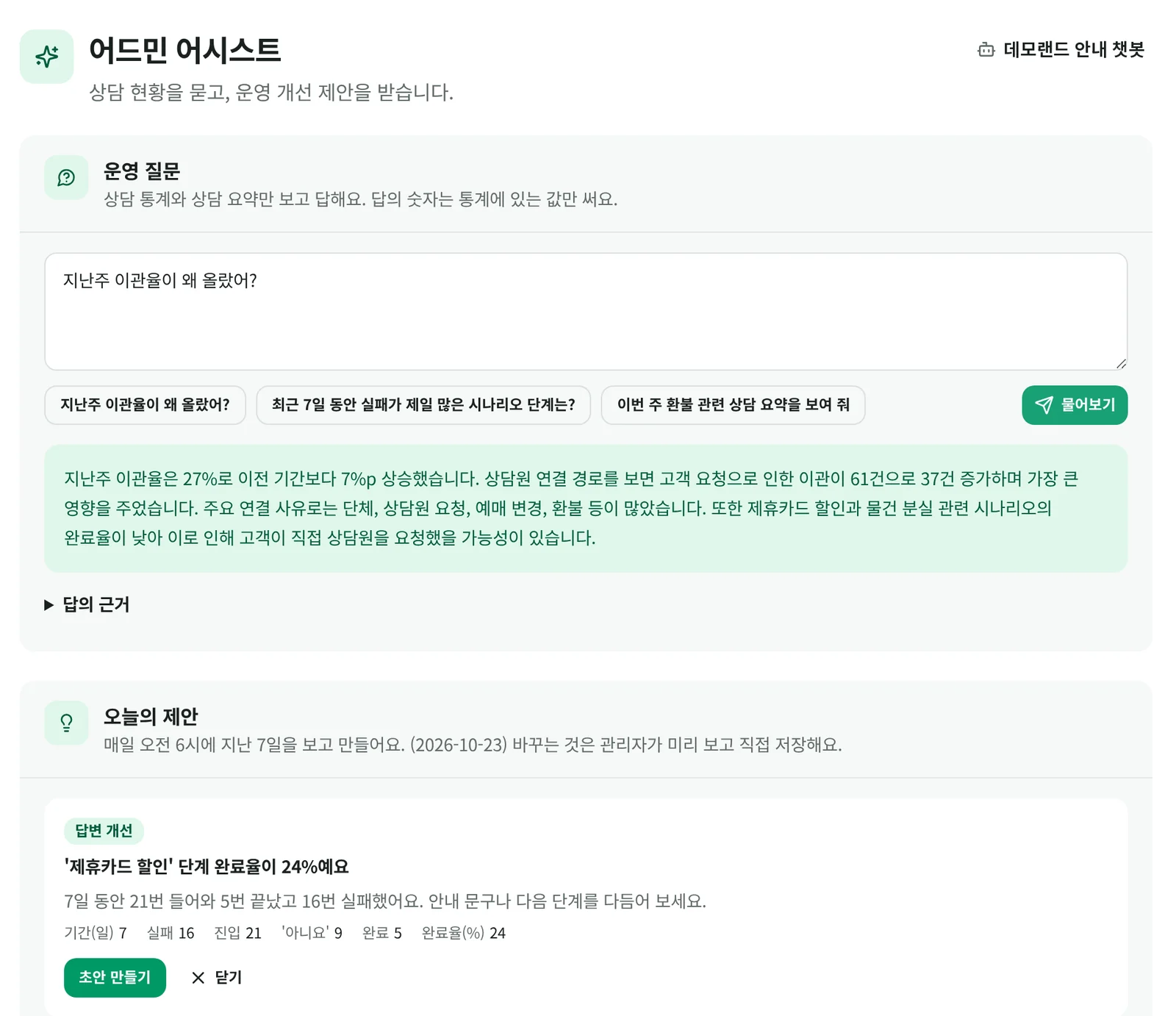
Admin Assist. Asked why last week’s handoff rate went up, it answers with evidence, followed by a suggestion to fix low-completion steps

Admin Assist

Ask something like “Why did the handoff rate go up last week?” and it answers from support stats and summaries, showing the evidence. It only uses numbers that are in the stats.

  • Suggestion cards every morning at 6, based on the past 7 days
  • New buttons, knowledge gaps, better answers, site change impact
  • Admins review suggestions and save them themselves

Demo screens. The company name and conversations are fictitious data.

How we protect contacts and records

  • Contact details are masked by default

    Customer contact details are masked in conversations and history, and only admins can reveal them.

  • We log who viewed what

    Contact views, history searches, and Excel exports are recorded in the access log.

  • Each role sees different menus

    Agents use only the support menus, while operations and stats are for admins only. Your data is kept separate from other companies’ data.

  • A dedicated desk address for each company

    Agents and admins sign in at a company-specific address, and the desk has no ad tracking tools.

We tried it on our own service first

In March, we added an AI agent with the same setup to chat support in the Tikita app.

47 min → 11 sec

Time to first response

Median time to first response, including the AI’s notice that a person will take over

93%

After-hours and weekend inquiries answered within 5 minutes

Weekdays 7 PM–9 AM and weekends (64% of all inquiries) · 15% before AI

2 in 3

Questions the AI handled on its own

Excludes bugs and requests that need development, sensitive account or enforcement actions, and refunds

89% → 62%

Share of inquiries answered by agents

Inquiries with an agent message (including replies sent from AI drafts)

Share of inquiries with a first response within 5 minutesOctober covers the 1st–24th
Share of inquiries with a first response within 5 minutes
MonthRate
Jan18%
Feb22%
Mar (Mar 3: AI support launched)92%
Apr98%
May98%
Jun96%
Jul98%
Aug96%
Sep87%
Oct89%

Tikita app chat support · Before: Jan 2–Mar 2, 2026 (507 inquiries) / After: Aug 1–Oct 24 (3,747 inquiries) · Per question: 269 matching questions in 267 inquiries, Oct 15–21 · “Handled” = resolved by AI answers without an agent stepping in

The #1 overall voice
in the Korean TTS Arena

Humelo DIVE Nana, Sody’s default agent voice, took first place by ELO score in a blind test where listeners pick the more natural voice without knowing the model names, ahead of every TTS rival from Korea and abroad (rivals: 8).

Overall rank
#1
ELO score
1,716
Lead over #2
+34
  1. 1Humelo DIVE Nana1,716
  2. 2Company A1,682
  3. 3Company T1,633
  4. 4Company G1,614
  5. 5Company C1,442
  6. 6Company S1,395
  7. 7Company E1,393
  8. 8Company O1,320
  9. 9Company N1,260

Basis: ELO scores from all votes in the overall category of the Korean TTS Arena (Hugging Face). Two models read the same Korean sentence, listeners pick the more natural one without knowing the model names, and the votes are converted into ELO scores to set the ranking. Checked on October 29, 2026. Total votes: 8,784. Other companies’ models are shown by the first letter of their English names. View leaderboard

Pay only for calls,
by the minute

180KRW / min and up

VAT not included · Varies with integrations

For annual contracts or high volume

Our team will walk you through pricing and setup based on your call volume and integrations.

Get started in three steps

  1. 01Upload your docsUpload your support manual and FAQ files.
  2. 02Pick a voicePick an agent voice or create your brand voice.
  3. 03Connect your numberTry it on a test number first, then connect it with call forwarding from your main number.

Frequently asked questions

Are the orders and bookings in the browser demo call real?

No. It’s fictitious data, so no real orders, payments, or bookings change.

Why do you ask for a number or email before the call?

Browser demo calls are long, so we ask for it to prevent abuse. After the call, we send a demo summary and how to talk to sales to that contact. We send advertising only if you consent to it separately.

How long does it take to get started?

Leave a sales consultation request, and our team will contact you. Connecting your actual main number and integrations like order lookups depend on the scope, so we set the schedule together during the consultation.

Can I keep the main number I use now?

Yes. Just set up call forwarding from your current main number to the AI agent’s number. You don’t need to give customers a new number.

What about questions the AI agent can’t answer?

It can transfer the call to a person right away. If no one can pick up, it logs the request, passes it to the right staff member, and lets you know on Slack.

How do you handle call content and customer information?

Calls are kept as summaries and conversation history. Audio of what the customer said is kept for up to 1 year for consultation review, then deleted. We can also discuss installing it on your internal network (on-premises) so data never leaves your company.

Can I set it up on my phone?

You can try the demo right on your phone. Our team will walk you through setting up your company’s agent during the sales consultation.

Do agents have to watch every chat?

No. The AI scores each customer message for risk signals from 0 to 100 and sorts it into Caution, Intervention advised, or Urgent. Agents only need to check conversations in Suggested interventions, and Urgent ones trigger desk alerts and Slack notifications.

If our website changes, do the chatbot’s answers change too?

Yes. It reads the sites you choose on a set schedule and shows only the paragraphs that changed. Sensitive details like prices and hours go live after staff review, and you can roll back to the previous version even after publishing.

What happens to chats that come in when no agents are available?

Outside business hours or when the wait gets long, the chat window switches to leaving a message. Agents review those messages in the desk.

Who can see customer contact details?

Contact details are masked by default in conversations and history. Only admins can reveal them, and every view, search, and export is recorded in the access log.

One call beats
any explanation